Practical guide
Business-Day Calculations with Different Weekend Rules
Choose the controlling calendar, write which weekdays it excludes, and separate an inclusive date-range count from an offset that excludes the start. Compare Saturday/Sunday and Friday/Saturday patterns using original November 2026 traces, closure examples, spreadsheet formulas and eight explained decisions. Download a blank calculation record so the result can be checked.
Choose the business calendar before doing the arithmetic
A business day is an included date under a particular calendar. “Skip the weekend” is not a complete instruction: which days, whose calendar, which extra closures and what counting method? Two services in the same location can follow different schedules.
For the examples below, Calendar A excludes Saturday and Sunday. Calendar B excludes Friday and Saturday. These are chosen demonstration patterns, not claims that every organization in a country uses them. All dates use the Gregorian calendar and the year 2026. Unless an example says otherwise, there are no additional closures.
Start with the organization’s current written schedule or the definition that controls your task. An employee’s working days, a carrier’s processing days and an appointment counter’s public hours can differ. A half-day may still be an included date under a whole-day rule; the calculation does not prorate hours.
Record a cutoff separately. A request received after a service’s cutoff might have a later effective start date, even when its submission date is a weekday. First establish that effective date from the service’s instructions, then apply the counting rule. This guide does not move a filing deadline or promise a transaction completion date.
Write the weekend rule in a form you can inspect
Excel’s international workday functions accept a seven-character weekend string. Read its characters from Monday through Sunday: 1 means a nonworkday and 0 a scheduled workday. Keep the string quoted in a formula so its leading zeros remain part of the value.
| Excluded weekdays | String | Excel weekend number | Working weekdays |
|---|---|---|---|
| Saturday and Sunday | 0000011 | 1 or omitted | Monday–Friday |
| Friday and Saturday | 0000110 | 7 | Sunday–Thursday |
| Sunday only | 0000001 | 11 | Monday–Saturday |
| Friday, Saturday and Sunday | 0000111 | Use the string | Monday–Thursday |
For Friday/Saturday off, 0000110 has ones in the fifth and sixth positions. Sunday is the seventh position and remains zero, so Sunday can count. Reversing the meanings of zero and one, or starting the string on Sunday, silently creates another calendar.
A weekend number is not a weekday number. Excel’s 7 selects the Friday/Saturday pair; it does not mean “exclude the seventh weekday only.” The string is often easier to inspect because every day’s status is visible.
A fixed weekly mask cannot describe a rotating roster by itself. If the actual schedule changes across the range, use a dated schedule of included and excluded days or a tool that supports that rule. Seven ones leave no scheduled workday; Microsoft documents that mask as invalid for WORKDAY.INTL.
Counting working dates is different from finding a later date
A range count asks, “How many included dates are in this interval?” Write whether the start and end are included. The examples here count both endpoints. That convention differs from measuring elapsed days, which measures the distance between dates.
From Monday, 2 November through Friday, 6 November 2026, an inclusive Saturday/Sunday calendar counts five working dates. A Friday/Saturday calendar counts four: Friday is excluded. No holiday list is needed to explain the difference.
From Thursday, 5 November through Monday, 9 November, each pattern counts three working dates. Calendar A includes Thursday, Friday and Monday. Calendar B includes Thursday, Sunday and Monday. Matching totals do not establish that the schedules are interchangeable.
For a same-date range, the inclusive count is one if that date is included, or zero if it is excluded. Do not turn a same-date request into an automatic one-day result without checking the schedule. Keep the interval direction visible too: spreadsheet functions can represent a reversed interval differently from a worksheet that requires start ≤ end.
Trace an offset one date at a time
An offset asks, “Which date comes after N working days?” For positive offsets here, exclude the start date. Move to the next calendar date, test whether it is included, and advance the working-day counter only if it passes. Continue until the counter reaches the requested number.
Starting Thursday, 5 November 2026 and adding one workday gives Friday, 6 November with Saturday/Sunday off. With Friday/Saturday off, Friday and Saturday are skipped; Sunday, 8 November is workday one. The diagram shows the identical start and different result.
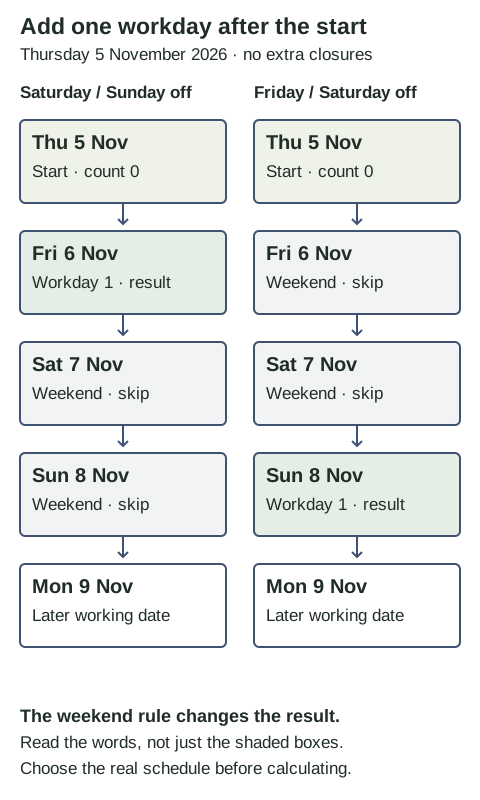
The longer trace below adds four working days after Monday, 2 November. Notice that Monday is marked “start” rather than workday one. Tuesday, Wednesday and Thursday supply the first three counted dates in both calendars.
| Calendar date | Saturday/Sunday off | Friday/Saturday off |
|---|---|---|
| Mon 2 Nov | Start; not counted | Start; not counted |
| Tue 3 Nov | Workday 1 | Workday 1 |
| Wed 4 Nov | Workday 2 | Workday 2 |
| Thu 5 Nov | Workday 3 | Workday 3 |
| Fri 6 Nov | Workday 4 — result | Weekend; skip |
| Sat 7 Nov | Weekend; skip | Weekend; skip |
| Sun 8 Nov | Weekend; skip | Workday 4 — result |
| Mon 9 Nov | Workday 5 | Workday 5 |
| Tue 10 Nov | Workday 6 | Workday 6 |
Four workdays gives Friday 6 in Calendar A and Sunday 8 in Calendar B. Five workdays gives Monday 9 in both. Check the trace, not only the endpoint, when validating a calculator against your actual schedule.
For a negative offset, move backward through calendar dates and count only included dates. For example, one workday before Sunday, 8 November is Friday 6 with Saturday/Sunday off, but Thursday 5 with Friday/Saturday off. The Sunday start is excluded from that backward count even when it is a scheduled workday.
Add the relevant closure dates without counting them twice
Make the weekly schedule first, then exclude each extra closure date. A date either qualifies or does not. A holiday on an already excluded weekend date does not remove a second workday. Repeating the same holiday date in your notes should not change the calendar.
Suppose an invented organization closes on Friday, 6 November 2026. The inclusive 2–8 November range ordinarily contains five workdays under either two-day weekend. That extra closure reduces Calendar A to four, because Friday was included. Calendar B remains five, because Friday was already excluded. This invented closure is not an announced public holiday.
If the invented extra closure is instead Monday, 9 November, adding two workdays after Thursday 5 gives Tuesday 10 under both patterns. The first counted day is Friday 6 in Calendar A or Sunday 8 in Calendar B. Monday is then skipped, and Tuesday supplies the second counted day.
Use actual or observed holiday dates according to the controlling schedule. Do not automatically add both. OPM’s federal in-lieu-of guidance illustrates why employee workweeks and coverage matter: it distinguishes nonstandard schedules and full-time versus part-time or intermittent employees. That federal guidance does not establish every private service’s holiday list.
Keep the source, year and scope beside each excluded date. For a holiday-name disagreement, use the actual-versus-observed date guide before deciding which date your calculation excludes.
Use a count function for a count and an offset function for a date
Microsoft documents NETWORKDAYS.INTL as returning a number of whole workdays between dates and WORKDAY.INTL as returning a date serial before or after a specified workday offset. Both accept custom weekend parameters and optional excluded holiday dates.
These examples use Excel syntax. Enter actual date values, keep the weekend string quoted, and format date-serial results as dates.
Inclusive count, 2–6 November 2026:
=NETWORKDAYS.INTL(DATE(2026,11,2),DATE(2026,11,6),"0000011")
Expected count: 5
=NETWORKDAYS.INTL(DATE(2026,11,2),DATE(2026,11,6),"0000110")
Expected count: 4

One workday after 5 November 2026:
=WORKDAY.INTL(DATE(2026,11,5),1,"0000011")
Expected date: 2026-11-06
=WORKDAY.INTL(DATE(2026,11,5),1,"0000110")
Expected date: 2026-11-08
To add the invented Monday closure, put the real date value for 9 November 2026 in cell H2. Use this formula to include that excluded date:
=WORKDAY.INTL(DATE(2026,11,5),2,"0000011",H2:H2)
Changing the mask to "0000110" also gives 10 November in this particular case.
Microsoft states that a zero offset returns the specified start date. It does not mean “find the next open date.” A Saturday start can therefore remain Saturday with a zero offset. Positive, negative and zero operations should have separate expected examples.
Before applying any result, inspect the start date, weekend string, closure range and required endpoint convention. A formula can calculate the calendar you entered correctly while that calendar is the wrong one for the service.
When two parties must be available, name the combined rule
If an invented task requires both teams to be working, a date must qualify in both calendars. A Saturday/Sunday team and a Friday/Saturday team share Monday–Thursday working weekdays. Their combined excluded weekdays are Friday, Saturday and Sunday, represented by 0000111.
Starting Thursday, 5 November 2026, their first common workday after the start is Monday, 9 November. Friday fails Team B’s schedule, Saturday fails both and Sunday fails Team A’s. A result of Friday or Sunday would answer one team’s calendar rather than the stated joint task.
This intersection is appropriate only because the example explicitly requires both teams. A real delivery, payment, approval or support process may name one calendar, several processing stages or another convention. Establish that rule before combining lists. Include extra closures from either team when both must be available.
Working-date agreement still does not establish overlapping opening hours across time zones. If a shared call or handoff matters, check the relevant local hours and date separately. A whole-day count does not calculate a meeting time.
Eight business-day decisions with full explanations
All eight scenarios use November 2026 and the stated demonstration calendars. Treat an organization closure as invented unless an actual source is supplied. Write the included dates before opening each answer.
Case 1
An invented organization excludes Friday and Saturday. Starting on Thursday, 5 November 2026, what date is one workday later if the start is excluded and there are no extra closures?
Show answer and explanation for case 1
Sunday, 8 November 2026.
Friday 6 and Saturday 7 are nonworkdays under this chosen calendar. Sunday 8 is the first included date after Thursday. A Saturday/Sunday default would instead return Friday 6.
Case 2
Count both endpoints from Monday, 2 November through Friday, 6 November 2026. No extra closures apply. How many working dates are there under each two-day weekend?
Show answer and explanation for case 2
Five with Saturday/Sunday off; four with Friday/Saturday off.
The inclusive range has five dates. Monday through Thursday count in both calendars. Friday counts only in the Saturday/Sunday calendar. The count is not the number of elapsed nights or an offset from Monday.
Case 3
From Monday, 2 November 2026, add four workdays, excluding the start and using no extra closures. Compare the two weekend patterns.
Show answer and explanation for case 3
Friday, 6 November with Saturday/Sunday off; Sunday, 8 November with Friday/Saturday off.
Tuesday, Wednesday and Thursday are the first three workdays after Monday in both patterns. The fourth is Friday in the first calendar and Sunday in the second. The daily trace makes the two skipped dates visible.
Case 4
The inclusive range is Thursday, 5 November through Monday, 9 November 2026. Both weekend patterns give three workdays with no extra closures. Does that prove the masks are interchangeable?
Show answer and explanation for case 4
No. The counts match, but one includes Friday and the other includes Sunday.
Saturday/Sunday off counts Thursday 5, Friday 6 and Monday 9. Friday/Saturday off counts Thursday 5, Sunday 8 and Monday 9. Equal totals can conceal different operational dates.
Case 5
Your invented organization has an extra closure on Friday, 6 November 2026. Count 2–8 November inclusively. Does adding this closure reduce the result under both weekend patterns?
Show answer and explanation for case 5
It reduces the Saturday/Sunday result from five to four; the Friday/Saturday result remains five.
Friday was a working date in the first pattern and already a weekend date in the second. A date that is already excluded cannot remove another working date. This is a fictional closure, not an announced public holiday.
Case 6
Start on Thursday, 5 November 2026 and add two workdays, excluding the start. The invented organization also closes on Monday, 9 November. What result do the two weekend patterns give?
Show answer and explanation for case 6
Tuesday, 10 November 2026 in both patterns.
The first included date is Friday 6 under Saturday/Sunday off and Sunday 8 under Friday/Saturday off. Monday 9 is excluded by the additional closure. Tuesday 10 is the second included date in either trace.
Case 7
What does Excel WORKDAY.INTL return for a zero offset from Saturday, 7 November 2026? Does the result establish that Saturday is open?
Show answer and explanation for case 7
It returns the specified start date, 7 November; that does not establish an open day.
Microsoft documents zero as returning the already specified start date. Moving a nonworking date to the next working date is a separate operation with its own rule. Do not use a zero offset as an opening-hours check.
Case 8
An invented joint task can occur only when both teams are working. Team A excludes Saturday/Sunday; Team B excludes Friday/Saturday. No other closures apply. From Thursday, 5 November 2026, what is their first common workday after the start?
Show answer and explanation for case 8
Monday, 9 November 2026.
Friday is unavailable to Team B, Saturday to both, and Sunday to Team A. Their common working weekdays are Monday through Thursday. This assumes both teams must be available; a real service may define a different controlling calendar.
Keep a record that another person can reproduce
Download the business-day calculation worksheet. It contains a blank rule record, daily trace rows, these eight questions and their explained answers. It also keeps the count and date-offset operations distinct.
Task and controlling organization:
Schedule source, year and date checked:
Effective start date and any cutoff rule:
Operation: inclusive range count / workday offset / other:
End date, or whole-number offset:
Included endpoints and direction:
Excluded weekdays, written Monday through Sunday:
Extra closure dates, with scope and source:
Daily included/skipped trace:
Result and any service-hour checks still needed:
Do a short independent check before reusing a calculator: one range with different Friday/Sunday treatment, one offset across the weekend, one extra closure and one zero-offset example. If the result differs, compare the entered rules and included dates before assuming the date arithmetic is broken.
For an operational holiday list, the federal-versus-state calendar guide helps identify which source applies. Once that choice is made, this worksheet makes the calculation visible without treating a public holiday list as a universal business schedule.
Load a continuous shutdown as dates, then inspect the union
A continuous closure needs a list of excluded dates, not a second number subtracted after the workday calculation. This original fictional organization excludes Saturday and Sunday and closes from 29 December 2026 through 3 January 2027 inclusive. It is not an official Christmas, New Year or company announcement.
Count both endpoints from 28 December 2026 through 4 January 2027. The interval has eight dates. The shutdown contributes six dates; Saturday 2 January and Sunday 3 January are already inside those six. The union excludes six dates, leaving two included working dates.
| Date | Weekly weekend? | Fictional shutdown? | Included? |
|---|---|---|---|
| 28 Dec 2026, Monday | No | No | Yes |
| 29 Dec 2026, Tuesday | No | Yes | No |
| 30 Dec 2026, Wednesday | No | Yes | No |
| 31 Dec 2026, Thursday | No | Yes | No |
| 1 Jan 2027, Friday | No | Yes | No |
| 2 Jan 2027, Saturday | Yes | Yes | No |
| 3 Jan 2027, Sunday | Yes | Yes | No |
| 4 Jan 2027, Monday | No | No | Yes |
The included dates are 28 December and 4 January, so the inclusive result is 2. Subtracting six shutdown dates and two weekend dates separately would give zero by counting 2 and 3 January twice. The earlier single-date examples teach the same exclusion rule; this expanded input makes the multi-day and cross-year task reproducible.
Download the six-date shutdown input CSV, complete daily trace CSV and formula and rule record. The CSV includes scope so a fictional closure does not become an unlabeled operational holiday list.
For an Excel-style calculation, put the six closure dates into H2:H7 as actual date values. A CSV string looking like YYYY-MM-DD does not prove a cell is a numeric date. Confirm the imported cell type and date before using it, or enter DATE(2026,12,29) and the other exact values explicitly.
=NETWORKDAYS.INTL(DATE(2026,12,28),DATE(2027,1,4),"0000011",H2:H7)The independently enumerated expected count is 2. This batch did not execute Excel or DayMoon’s calculator. The formula follows Microsoft’s documented weekend and holiday-date inputs; compare a real tool result with the eight rows instead of treating a written formula as a test log.
For your real shutdown, replace the six invented dates with the responsible organization’s current notice, retain the year and scope, and decide whether endpoints are included. Check partial days and service cutoffs separately: this is a whole-date calculation. A continuous closure has no effect on public holiday names unless a governing source states otherwise.
Sources and further reading
- Microsoft Support: NETWORKDAYS.INTLWhole workday counts, seven-character Monday-first weekend strings, weekend numbers and additional holiday dates. Additional reference: Weekend mask and optional dated exclusions; dates may be supplied in cells.
- Microsoft Support: WORKDAY.INTLOffsets that return dates, positive/negative/zero behavior, custom weekend masks and excluded holiday dates.
- OPM: Federal Holidays — “In Lieu Of” DeterminationCovered federal employee schedules, nonstandard workweeks and agency determination. This is a scoped example of why observance depends on the schedule, not a worldwide weekend rule.
Check the event rule as well as the calendar view
Use the calendar event-rule collection to compare date selection, recurrence endings, single-occurrence changes and availability.