Practice worksheet
How to Import an ICS Calendar Without Duplicate Events
Choose a file copy or a maintained subscription, identify the destination calendar and import once before inspecting the result. This guide compares the workflows, explains apparent duplicates and all-day dates, and supplies a backup-first review record with six explained decisions. Calendar apps do not all apply the same replacement rules.
Choose a snapshot or a maintained subscription
An ICS file carries calendar data. Downloading or importing it is not the same operation as subscribing to its publisher’s online calendar. Before adding anything, decide whether you want a dated copy or future changes.
Microsoft distinguishes a file import, which does not refresh when its owner makes updates, from an online subscription, which receives updates. Its guidance warns that subscription refresh can take more than 24 hours. [1] Do not use a repeated import or a second subscription as a general refresh button.
| Question | Import a file | Subscribe to a feed |
|---|---|---|
| What you add | A saved .ics file containing an exported snapshot. | An online calendar URL offered for subscription. |
| Later source changes | The imported copy does not automatically refresh. | Updates can arrive through the subscription, with a delay. |
| Main repeat risk | Importing overlapping files into an existing destination. | Displaying the same source through several calendars or subscriptions. |
| Good planning use | A deliberate transfer or a dated reference copy. | A changing schedule that the publisher maintains. |
| What to retain | Source, file date, destination, import result and checked sample. | Publisher, subscription calendar, update expectations and checked sample. |
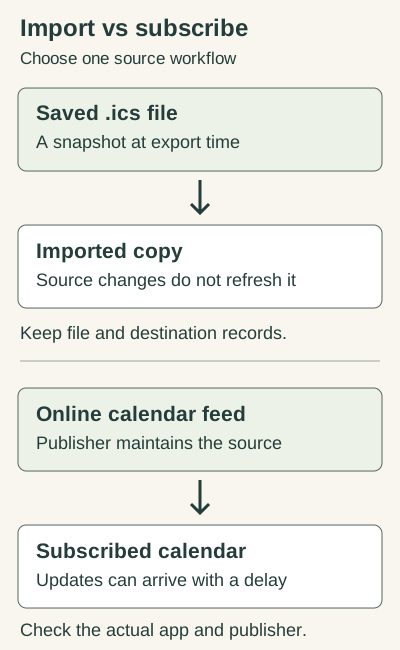
For a changing school calendar, the publisher’s maintained subscription may fit better than accumulating term-by-term copies. For a one-time transfer, a clearly identified file and destination may be appropriate. A calendar’s published date still needs the scope checks in the federal versus state holiday guide.
Check the account, destination and existing sources first
- Name the account and app. A phone can display several accounts at once. Identify where the new data will actually be stored.
- Identify the source. Record its publisher, date range, export time and filename. Similar filenames can contain overlapping events.
- Check existing sources. Look for an earlier import, a subscribed feed or a built-in holiday calendar covering the same dates.
- Choose the destination deliberately. A separately named calendar, where your app supports one, can make a reference import easier to identify. Avoid sending every trial into your personal primary calendar.
- Back up the destination before changing it. Use the app’s supported export or backup and check that you can locate the saved copy.
- Choose representative events. Pick an all-day item, a timed item and a repeating series or exception when present.
- Import once, then inspect the result. Record the message and actual events before deciding whether another action is needed.
Google’s export guidance requires a computer and the calendar’s “Make changes and manage sharing” permission; an organization can restrict exports. [2] If you cannot make a supported backup, ask the responsible administrator before a cleanup that could affect shared events. An exported file is a reference copy; it may not preserve every account feature or sharing arrangement.
Keep private feed URLs and personal appointment data in your own records. A worksheet shared with others can identify the publisher and calendar name without exposing a secret calendar address.
Use the actual import path and confirm what arrived
These are the currently documented computer/web routes. Account type and interface updates can change labels, so follow the linked help for your app rather than a screenshot from another version.
Google Calendar on a computer
- Open the intended Google Calendar account.
- Go to Settings, then Import & Export.
- Select the exported .ics file and explicitly choose the calendar receiving it.
- Click Import once. Inspect your selected sample events and record the result.
Google says ICS and CSV imports are available on a computer and that the primary calendar is the default destination. If an export is a ZIP containing several calendars, extract the individual ICS files and handle each deliberately. Guests and conference data are not imported with an event. [3] A migration that needs those details requires a separate check.
Outlook.com or Outlook on the web
- Open Calendar, then Add calendar.
- For a saved file, choose Upload from file, browse to the ICS file and select the destination calendar.
- Complete the displayed import action once and check the resulting events.
- For a maintained online source, use Subscribe from web with the publisher’s calendar URL instead of uploading another saved copy.
Microsoft documents both personal and work/school routes. The subscription flow may end with a button called Import or Import and Save; the earlier choice of Subscribe from web establishes the workflow. A button label alone does not tell you whether you are making a snapshot or connecting a feed. [1]
Find out where the apparent duplicate lives
First, temporarily hide one displayed calendar at a time, where your app supports that control. Note which entry disappears. This is a display check: it does not remove stored events. If two calendars each supply the same holiday, your problem may be overlapping sources rather than two records inside one destination.
| What you see | Check | Next decision |
|---|---|---|
| Two calendars display the same title | Hide one calendar at a time; note which copy disappears. | Choose the display/source you need. Hiding a calendar does not remove its events. |
| Two copies remain in one calendar | Compare title, start/end, source and any available event details. | Review the import history and back up before removing a confirmed extra copy. |
| A holiday and an observed holiday appear | Read the labels, dates and jurisdiction. | Keep both if they represent different date types; do not deduplicate by holiday name alone. |
| A school or venue changed the schedule | Compare the current publisher schedule with the import date. | A file import may be stale. Agree one maintained source rather than stacking newer snapshots. |
| One repeating event has a changed occurrence | Check the recurrence series and the specific exception. | Do not delete every component with the same UID; an exception can be intentional. |
| An event moved by an hour or a day | Compare all-day status, source/export time zone and destination settings. | Investigate time interpretation before treating the shifted entry as another event. |
| Import reports zero or partial events | Read the exact result and inspect the destination. | Confirm what arrived before retrying; use the provider’s specific error guidance. |
| Subscription has not reflected a change | Verify the publisher changed the feed and the intended subscription is visible. | Allow the documented refresh delay; do not create another subscription merely to force an update. |
Google specifically notes that “Processed zero events” can occur after a successful first import when Import was clicked again. Check whether the expected events already arrived. It also describes partial-processing errors, file-size and formatting problems, and incorrect time-zone results. [4] That documented behavior does not establish how every application treats every regenerated or edited file.
Keep the result message verbatim in your record. “Nothing happened” can mean the destination was hidden, the wrong account was selected, some events were rejected, or an earlier import already added them. Repeating an action before locating the records makes those possibilities harder to distinguish.
Know why matching titles and matching UIDs are different
RFC 5545 defines UID as a persistent, globally unique identifier for a calendar component. It defines SEQUENCE as a revision sequence number and RECURRENCE-ID as the identifier of a particular original occurrence in a recurring component. [5] These fields help explain the data, but a file format specification is not a promise about every app’s import-replacement policy.
| Field | What it describes | Important limit |
|---|---|---|
| UID | Persistent identity of a calendar component. | A matching title is not a matching UID; import behavior still depends on the app. |
| SEQUENCE | Revision sequence number within component revisions. | Changing it is not a universal way to force a file importer to replace an event. |
| RECURRENCE-ID | Identifies a specific original occurrence within a recurring component. | A series and its exception can share a UID without being unwanted copies. |
| DTSTART / DTEND | Start and end values, with date/time interpretation. | Compare all-day values and time zones; an exclusive end is not another displayed day. |
Do not rename events or regenerate their UIDs to make a repeated transfer look new. That may hide the relationship you are trying to preserve. Conversely, do not delete all components sharing a UID: a recurring series and its deliberately changed occurrence can require that relationship.
A repeating event can also export as separate one-time entries, according to Google’s import troubleshooting. [4] Compare the source recurrence behavior with the destination before deciding that a larger count proves duplication. Most readers should use supported calendar tools; manually editing recurrence rules is not the first cleanup step.
Check dates and time interpretation before deduplicating
For timed entries, compare the source application’s zone, the exported event’s time representation and the destination’s settings. Google’s troubleshooting begins a wrong-time investigation by checking both applications’ time zones. [4] A one-hour shift is evidence to investigate, not permission to erase the apparently extra event.
RFC 5545 distinguishes DATE values from DATE-TIME values. A DATE-TIME can be UTC with a Z suffix, floating local time or local time with a time-zone reference. A bare local time can behave differently from a fixed instant. [5] Retain the original export while investigating those differences.
This original fictional text example represents one all-day review day. It is shown to explain fields, not offered as a production migration file or a tested import:
BEGIN:VCALENDAR
VERSION:2.0
PRODID:-//DayMoon//Illustrative practice only//EN
BEGIN:VEVENT
UID:daymoon-practice-review-20270115@daymooncalendar.com
DTSTAMP:20261030T160000Z
DTSTART;VALUE=DATE:20270115
DTEND;VALUE=DATE:20270116
SUMMARY:Practice review day - fictional
END:VEVENT
END:VCALENDAR
DTSTART identifies January 15, 2027. DTEND is January 16 because the VEVENT end is non-inclusive: this sample covers January 15 only. [5] The timestamp is metadata, not the day on which the fictional event takes place. Do not “fix” the end by subtracting a day; that changes the interval instead of correcting a duplicate.
For holidays, also distinguish the actual holiday, an observed workday and a separately scheduled local event. Similar labels can legitimately describe different entries. The actual versus observed date examples explain that distinction.
Remove only a confirmed extra copy after preserving what matters
Once the source and destination are clear, choose which record or feed is authoritative. Inspect personal edits, notes and unique appointments before removing anything. A calendar named for an imported holiday file may later contain events you added yourself.
- Locate a supported backup and understand your app’s recovery options.
- Record the exact calendars and suspected pair.
- Compare date type, times, recurrence, source and any unique details.
- Decide which item or source you intend to retain and why.
- Use the app’s supported control for that specific, confirmed scope.
- Check that the retained events and unrelated appointments remain available.
Deleting a whole calendar or every matching title is not a general-purpose deduplication method. If the source owns a read-only subscribed calendar, manage the subscription or display through supported controls rather than trying to edit its individual entries. If you cannot determine ownership or recovery, keep the issue unresolved and ask the administrator or provider about the exact account and records.
Afterward, mark the file as already handled in your local record. For future changes, maintain the chosen workflow: one known subscription, or a documented transfer process that deals with overlap deliberately. Do not layer successive yearly files over the same destination without reviewing their date ranges.
Use a record that makes the next import easier
Download the import checklist, duplicate-review record and annotated example (TXT). It is a blank working sheet, not an automated cleaner.
A useful completed record might say: “School term reference, file exported October 30, imported once into School Reference; all-day sample and weekly class checked; later timetable changes must be checked on the publisher’s maintained source.” That is an invented illustration, not a report from a real account.
The record should answer four questions: Which source supplied the events? Where did they go? What did you verify? How will later changes be handled? Keep unresolved time, recurrence and ownership questions visible instead of filing the export under a vague name such as new-calendar-final.
Six checks before you retry or remove events
These original scenarios test the distinction between a copy, a subscription, a date interval and an intentional recurrence exception.
Case 1
Google reports “Processed zero events” immediately after you clicked Import for a second time. Should you keep clicking until the count increases?
Show answer and explanation for case 1
Inspect the intended destination first.
Google documents this message after a successful first import when a second click finds no new events. Confirm the expected samples and result before retrying. This does not prove that every edited export will be deduplicated.
Case 2
The same holiday appears in your imported reference calendar and a subscribed holiday calendar. Does that prove the reference calendar contains two stored copies?
Show answer and explanation for case 2
No. Isolate the displayed calendars first.
Each source may supply one entry. Temporarily hiding one calendar can show that the overlap comes from two calendars. Then choose the source or display you need without guessing that every matching title must be deleted.
Case 3
A changed recurring occurrence shares the UID of its series. Should all but one component with that UID be removed?
Show answer and explanation for case 3
No. Review the series and its recurrence exception.
RFC 5545 uses UID for the component relationship and RECURRENCE-ID to identify an original occurrence. An intentional exception is not established as an unwanted duplicate by the shared UID.
Case 4
A fictional all-day entry has DTSTART 20270115 and DTEND 20270116. Is it necessarily a two-day event?
Show answer and explanation for case 4
No. The exclusive end leaves January 15 as the covered day.
For the shown DATE-valued VEVENT, DTEND is non-inclusive. Do not subtract a day from a valid end value in an attempt to eliminate a duplicate.
Case 5
You subscribed to a publisher’s calendar, then its web timetable changed. Does an unchanged view five minutes later mean you should subscribe again?
Show answer and explanation for case 5
No. Verify the source and allow the documented refresh behavior.
Microsoft warns that subscription updates can take more than 24 hours. Check that the feed itself changed and that the correct subscribed calendar is visible. A second subscription can add another overlapping source.
Case 6
A calendar named Holiday Import contains extra appointments you later added. Is deleting the entire calendar a safe shortcut?
Show answer and explanation for case 6
Only after understanding and preserving its contents; the name alone is insufficient.
Identify unique appointments, ownership, backup and recovery before any removal. Prefer a confirmed, specific cleanup scope. A separately named calendar is easier to inspect, but it does not prove every event is disposable.
When an imported title or description loses punctuation or accents
Text corruption needs a separate check from duplicate identity. Re-importing a file or changing its UID does not establish why “Café” lost its accent, a comma disappeared or a description broke into unintended fields. Keep the original bytes and compare the source’s intended text with the destination’s actual text.
RFC 5545 separates three operations. The default iCalendar stream charset is UTF-8. A TEXT value escapes a comma as \,, a semicolon as \;, a backslash as \\, and an intentional text newline as \n. A colon in a TEXT value must not be backslash-escaped. Long content lines should be folded at no more than 75 octets, excluding CRLF; a continuation begins with one space or tab. Folding does not insert a displayed newline.
SUMMARY:Café review\, room A\; fictional practiceThe expected summary is Café review, room A; fictional practice. The backslashes protect TEXT delimiters in the file; they are not intended title characters. This rule is property-specific. Do not escape the structural semicolons in RRULE:FREQ=WEEKLY;COUNT=3, or treat all parameter syntax as TEXT.
Download the complete fictional UTF-8 and folding specimen. Its description contains accents, punctuation, a literal backslash and one intentional content newline. It also has physical folded lines. The expected description, after unfolding and TEXT decoding, is:
Fictional encoding exercise: bring café notes, compare commas; retain a backslash \ in a sample path.
Second description line: this is content, while a folded physical line is only a transport continuation.
Unfold the transport lines before parsing properties. A continuation’s CRLF and first whitespace character disappear; any other content whitespace stays. Octets are bytes, so accented UTF-8 characters can take more than one octet. The original specimen generator avoids splitting a character’s bytes, and the check restores the exact intended summary and description. It does not certify every parser or import screen.
- Open a retained copy in a UTF-8-aware text tool and locate the complete property after unfolding.
- Compare its decoded text with the source text. If the export already lost a character, a destination retry cannot reconstruct it.
- If the source bytes are intact, inspect a non-sensitive single-event import and record the exact destination result.
- Keep the app, version, filename and error with the example. Do not bulk-replace personal entries while the corruption stage is unknown.
The same practice entry is a DATE-valued one-day event: 15 January 2027, with exclusive end 16 January. Its metadata stamp and unique practice UID have different purposes. Use the time-representation comparison when text is correct but a timed event’s clock changes; use this section when the characters or line structure are wrong.
Sources and further reading
- Microsoft Support: Import or subscribe to a calendar in Outlook.com or Outlook on the webFile snapshot versus subscription, documented web import routes and possible update delays.
- Google Calendar Help: Export events from your Google CalendarComputer export, required calendar permission, administrator restrictions and individual ICS files.
- Google Calendar Help: Import events to Google CalendarComputer import route, chosen destination, ZIP extraction, unsupported guest and conference details.
- Google Calendar Help: Fix problems importingRepeated-import zero-event message, partial results, time zones, file constraints and recurrence export differences.
- RFC 5545: Internet Calendaring and Scheduling Core Object SpecificationSelected sections on VEVENT, DATE/DATE-TIME, persistent UID, RECURRENCE-ID and revision sequence; not an app deduplication policy. Additional reference: Sections 3.1, 3.1.4 and 3.3.11: unfolding before parsing, stream charset and text escaping.